HTTPRoute + InferencePool Guide
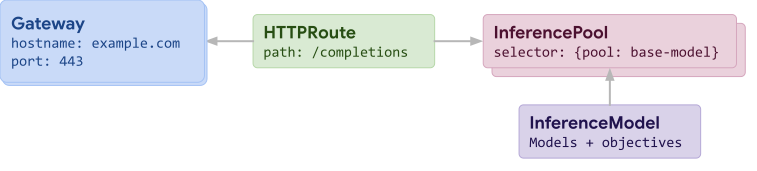
This guide shows how to use InferencePool with the standard Gateway API HTTPRoute for intelligent inference routing. This approach provides basic load balancing and endpoint selection capabilities for inference workloads.
Prerequisites
Before starting, ensure you have:
- Kubernetes cluster with Gateway API support
- Envoy Gateway installed and configured
Step 1: Install Gateway API Inference Extension CRDs
Install the Gateway API Inference Extension CRDs and controller:
kubectl apply -f https://github.com/kubernetes-sigs/gateway-api-inference-extension/releases/download/v1.6.0/manifests.yaml
Step 2: Configure Envoy Gateway for InferencePool
Install (or upgrade) Envoy Gateway with the InferencePool addon values file, and wait for it to be ready:
helm upgrade -i eg oci://docker.io/envoyproxy/gateway-helm \
--version v0.0.0-latest \
--namespace envoy-gateway-system \
--create-namespace \
-f https://raw.githubusercontent.com/theagentrouter/agent-router/main/manifests/envoy-gateway-values.yaml \
-f https://raw.githubusercontent.com/theagentrouter/agent-router/main/examples/inference-pool/envoy-gateway-values-addon.yaml

kubectl wait --timeout=2m -n envoy-gateway-system deployment/envoy-gateway --for=condition=Available
See the Envoy Gateway Installation Guide if you're combining this with other addons (like rate limiting), or already have Envoy Gateway installed and just need to add this values file.
Step 3: Deploy InferencePool Base Resources
Deploy the sample inference backends, InferencePools, and Endpoint Picker Providers (EPP) that the rest of this guide builds on:
kubectl apply -f https://raw.githubusercontent.com/theagentrouter/agent-router/main/examples/inference-pool/base.yaml
This creates:
- The
vllm-llama3-8b-instructInferencePool(a simulated vLLM deployment) with its Endpoint Picker Provider (EPP) - The
mistralInferencePoolwith its own Endpoint Picker Provider (EPP) - A standard
envoy-ai-gateway-basic-testupstreamAIServiceBackend/Backendused later for non-InferencePool (fallback) routing
Step 4: Configure Gateway and HTTPRoute
Create a Gateway and HTTPRoute that uses the InferencePool:
cat <<EOF | kubectl apply -f -
apiVersion: gateway.networking.k8s.io/v1
kind: GatewayClass
metadata:
  name: inference-pool-with-httproute
spec:
  controllerName: gateway.envoyproxy.io/gatewayclass-controller
---
apiVersion: gateway.networking.k8s.io/v1
kind: Gateway
metadata:
  name: inference-pool-with-httproute
  namespace: default
spec:
  gatewayClassName: inference-pool-with-httproute
  listeners:
    - name: http
      protocol: HTTP
      port: 80
---
apiVersion: gateway.networking.k8s.io/v1
kind: HTTPRoute
metadata:
  name: inference-pool-with-httproute
  namespace: default
spec:
  parentRefs:
    - group: gateway.networking.k8s.io
      kind: Gateway
      name: inference-pool-with-httproute
      namespace: default
  rules:
    - backendRefs:
        - group: inference.networking.k8s.io
          kind: InferencePool
          name: vllm-llama3-8b-instruct
          namespace: default
          weight: 1
      matches:
        - path:
            type: PathPrefix
            value: /
      timeouts:
        request: 60s
EOF
Step 5: Test the Configuration
Once deployed, you can test the inference routing:
# Get the Gateway external IP
GATEWAY_IP=$(kubectl get gateway inference-pool-with-httproute -o jsonpath='{.status.addresses[0].value}')
# Send a test inference request
curl -X POST "http://${GATEWAY_IP}/v1/chat/completions" \
  -H "Content-Type: application/json" \
  -d '{
    "messages": [
      {
        "role": "user",
        "content": "Say this is a test"
      }
    ],
    "model": "meta-llama/Llama-3.1-8B-Instruct"
  }'
How It Works
Request Processing Flow
- Client Request: Client sends inference request to the Gateway
- Route Matching: HTTPRoute matches the request based on path prefix
- InferencePool Resolution: Envoy Gateway resolves the InferencePool backend reference
- Endpoint Selection: Endpoint Picker Provider (EPP) selects the optimal endpoint
- Request Forwarding: Request is forwarded to the selected inference backend
- Response Return: Response is returned to the client
Next Steps
- Explore AIGatewayRoute + InferencePool for advanced AI-specific features
- Review monitoring and observability best practices for inference workloads
- Learn more about the Gateway API Inference Extension for advanced endpoint picker configurations